Latest Version for Ti7
10 Jul 2026
This is our latest version for the Ti7 display.
New Developments
We have added powerful new developments to enhance performance and usability. Here’s what’s new in this update.
Auto Tuning
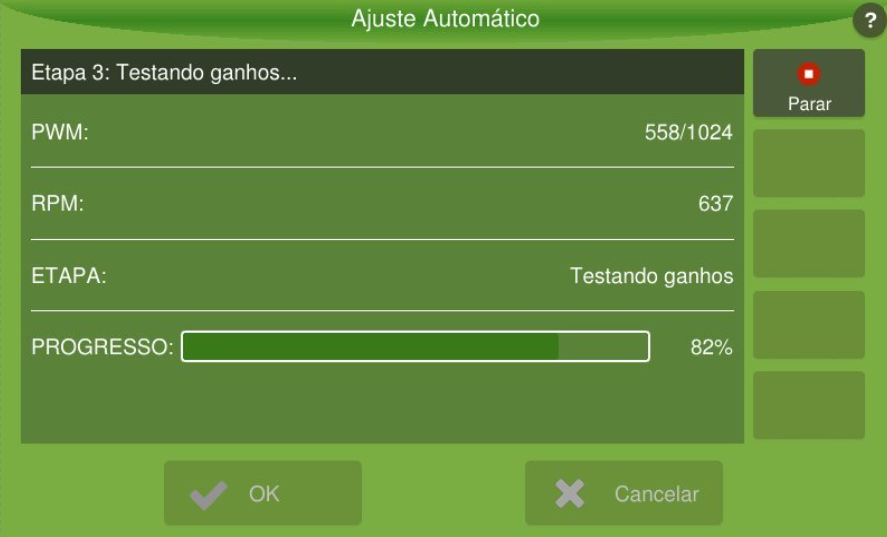
Tuning the rate controllers for fertilization just got easier and better. Auto Tuning is an automated routine that starts from the controller’s speed settings. The routing consists of a set of outputs which allows identification of good controller gains for this implement.
NovAtel SPAN Support
It is now possible to use SPAN for enhanced positioning in rough terrain, curves, and poor satellite reception. Contact Hexagon support for more information.
Radio Monitoring
When using Dynamic Haul Out Allocation, the Displays will automatically upload some data from all machines of the harvesting group. With Radio Monitoring, it is possible to know where the machines are and have an idea on what is happening even if most of the harvesting group does not have internet connection.
Simulated Speed
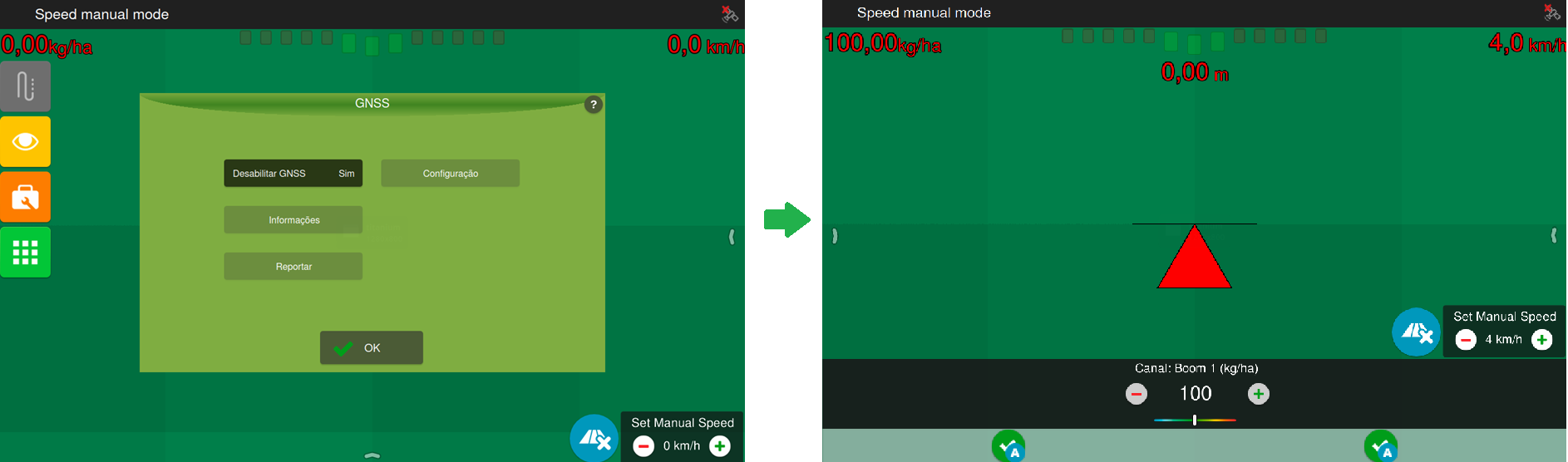
New mode where users can set a simulated speed, enabling implement tests, auditing input application, and operation in GNSS denied environments - jamming, spoofing or blocked satellite view. To use this mode, configure it in the GNSS settings screen and set the simulated speed in a new widget available in the operation screen.
Improvements
This update also includes refinements of existing features, improving performance and efficiency.
Global
-
The GNSS firmware used by the display has been updated to a newer version, helping maintain reliable positioning performance and ongoing compatibility.
-
The hardware model information is now clearly shown on the About screen to make identification easier.
-
We adjusted the steering behavior so guidance is more stable during operation.
-
Operation file (.ti) improvement: The points position now represents the middle of the implement boom. It used to represent the GNSS antenna position.
Auto Steering
-
Revamped Auto Steering algorithm achieving superior performance. In some tests, the distance to the expected path reduced from 30 cm to 5 cm. These improvements have higher impact in rough terrain conditions and curves. It is necessary to update the ECU Firmware to access these improvements.
-
New manual override gain: A new manual override gain has been introduced, starting with a compatibility mode. This update creates a new variable to save the manual override configuration for the Track Controller. Now, a value from 0 to 100% can be set, providing greater flexibility in manual override settings.
Dynamic Haul Out Allocation
-
More stable radio communication: The radio messages have been optimised, which reduces errors of overloaded network and missing messages.
ISOBUS TC
-
Support to Section Control anticipation set in the implement: For implements that support anticipation setting, the display will automatically use the values set by the implement. It can be viewed in the Section Control settings.
Machine Monitoring
-
Added IN operator in rules and improved user created Alarms title.
-
Gaps in machine monitoring data: We fixed an issue where simultaneous access by system functions could lock the database and prevent new messages from being saved. The system now manages database access more efficiently, keeping your monitoring data complete and up to date.
Bug fixes
This update addresses bugs to improve stability and reliability.
Better performance
-
During RMT pairing, the wireless connection between the Harvester and Haul-Out displays could become unstable. We adjusted this behavior to keep the connection stable throughout the process.
-
Improved stability during field operations. This update fixes a rare issue that, in some cases, could cause display to shut down unexpectedly.
Connectivity
-
Improved Wi-Fi network handling so network names, signal updates and saved networks are shown and refreshed more consistently across internal and external Wi-Fi.
-
Removed a false modem misconfiguration alarm on displays with a mobile communication modem when the modem is configured correctly.
-
Restored support for Wi-Fi dongle driver, which previously displayed the signal strength as 100%, even when the actual signal varied. Now, the displayed strength correctly reflects the real connection quality.
-
We adjusted how the terminal checks connectivity so it can switch to the best available network more reliably.
-
You can now establish a 3G mobile data connection on Ti7 without the modem remaining permanently stuck in "connecting" state despite the SIM card and signal being correctly detected.
Cloud
-
Correct vehicle identification in cloud fleet monitoring. You can rely on your vehicle's serial number being accurately reported to the cloud even after forced shutdowns, resolving rare cases where vehicles could appear with an incorrect identity in fleet monitoring.
Global
-
When the device was accessed remotely, the clock might display the wrong time. We adjusted the time handling so that the correct time is displayed even when GNSS is unavailable.
Implement Control
-
Your application values (applied area and rate) are now correctly saved when switching between work sections during sprayer control operations, ensuring accurate records for calibration auditing.
-
An issue that affected fertilizer calibration logging for compost boxes was resolved, each calibration event is now correctly attributed to the compost box you selected, even if the implement reconnects or reloads its configuration before you confirm the calibration.
Planting Assistant
-
Minor improvements and fixes.
Updates Handling
-
We adjusted the update process so it can complete normally. Before this, the display could freeze and close unexpectedly during a software update.
-
CTI/UTI updates via display could fail. We adjusted the update process so that they are downloaded and installed successfully.
Known Issues
Restoring a backup from a different model display will make the system crash.
-
Ti5 and Ti7 Wi-Fi resets from time to time, impacting on Wi-Fi pairing. The Estimated impact is to have trouble pairing around 9% of the attempts and completely failing 5% of the attempts.
-
Remote support may not work after installing a cti.
-
Subsoiler calibration does not work during implement creation.
-
Satellite count is always zero with OEM628 and NTRIP.
-
ALIGN: Rover position set as "unknown" after installing 4.8.1/4.8.2. After installing versions 4.8.1 or 4.8.2, the rover position may occasionally be shown as "unknown." This issue is not frequent and can be resolved by entering the GNSS screen and setting the position manually.
-
When operating in areas with variable mobile signal coverage, the 3G data connection may repeatedly disconnect and reconnect in a continuous loop, preventing stable connectivity.